Can Someone Find Your Location From a Photo?
Yes, and usually with more precision than people expect. If location was switched on when the shutter fired, the photo carries the exact spot you were standing in, not the city or the neighborhood. It travels inside the file, invisible in the picture itself, and it survives every copy, backup and forward.
That is worth knowing before you post a picture of your living room, your car for sale, or your child's first day at a new school.
How precise is "precise"?
Coordinates are stored as decimal degrees, and the number of decimal places decides how tightly they pin you down. Phones typically write six.
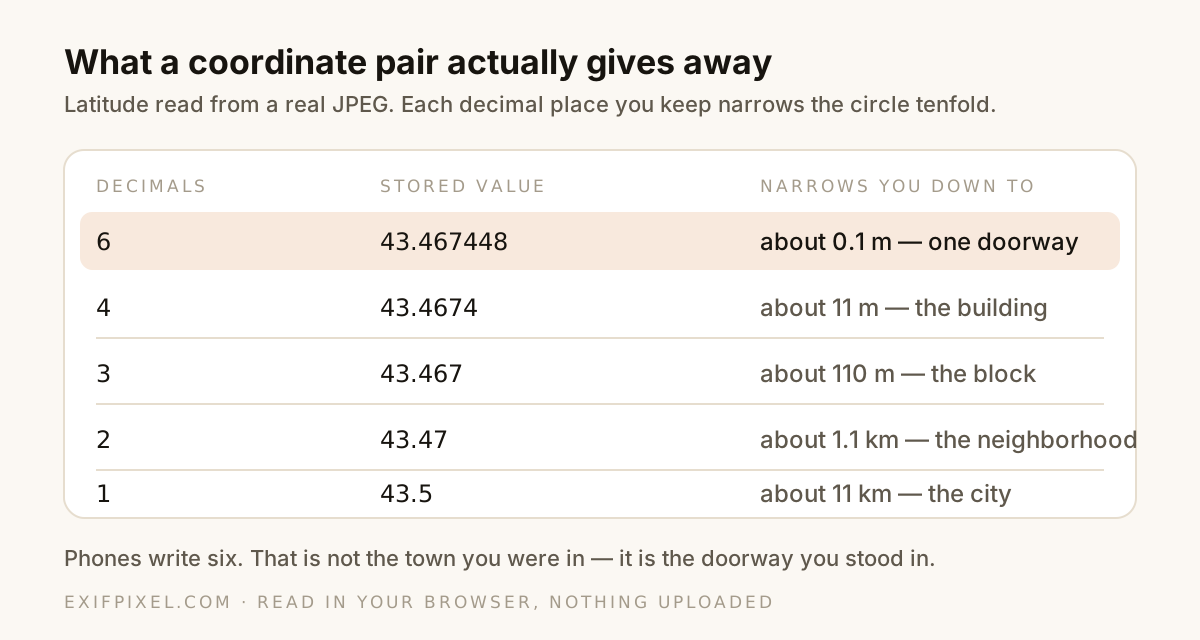
Alongside the coordinates a photo often stores altitude, the compass direction the lens was pointing, and the timestamp. Together those answer where you were, which way you were facing, and when — a more complete record than most people would volunteer in words.
How to check a photo you're about to post
You do not need an app or an account. Because the data is inside the file, a browser can read it directly. Nothing has to be uploaded anywhere.
See whether a photo carries your location. Open the GPS Extractor
If coordinates are present you will get a map link. If nothing appears, the photo either never had location or it has already been removed, which is genuinely good news.
Where location comes from, and where it goes
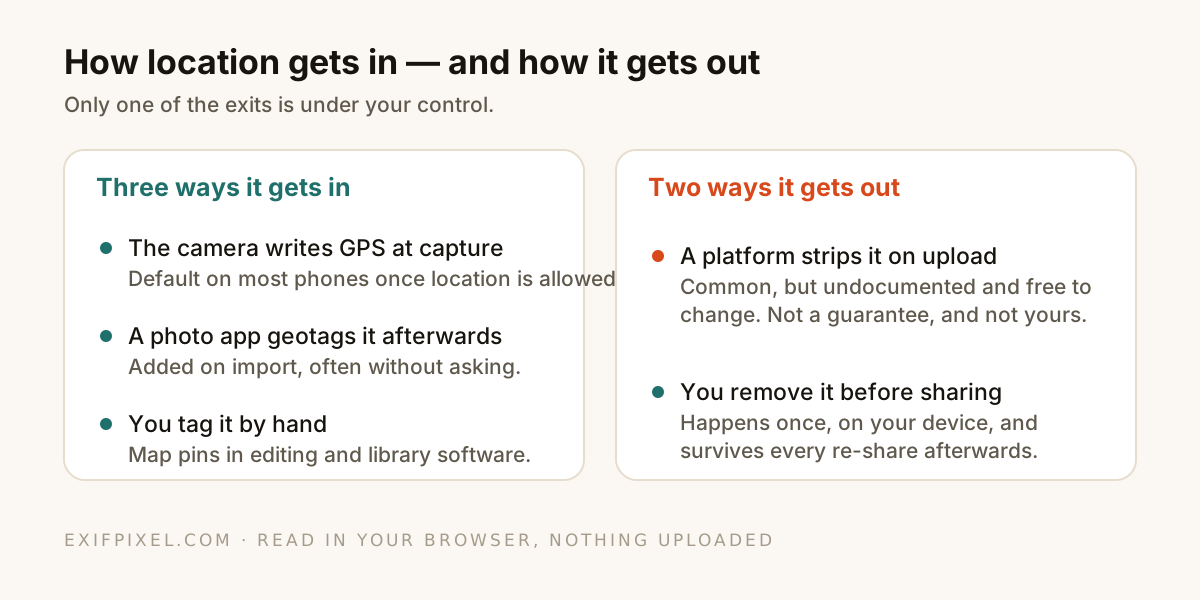
Instagram, Facebook, X and WhatsApp do generally strip metadata when you upload. That is real protection, but it is not a promise: it is undocumented behavior that varies by platform, by upload path and over time, and it does nothing for the file you send by email, upload to a marketplace, or hand over on a USB stick.
The situations that actually catch people out
- Selling something online. Marketplace listings frequently preserve the original file, and the photo of the item is usually taken at home.
- Renting out a room or a flat. The interior photos are geotagged with the address you did not want in the ad.
- Posting about a place you visit weekly: a gym, a school gate, a regular café. One photo is a location; a series is a routine.
- Sending an original file to a stranger. "Send as original quality" is precisely the option that keeps the metadata.
- Photographing lost pets or found items with your own home in frame and in the coordinates.
Removing it without losing everything else
You do not have to strip the whole file. The GPS block can be cut on its own, leaving the camera model, exposure settings and capture date intact, which matters if you keep metadata for your own archive or portfolio.
Cut the coordinates, keep the rest. Open Remove GPS Data
If you would rather remove everything, the full EXIF remover does that in the same lossless way: the metadata block is cut out and the image data is copied byte for byte, so the picture itself is untouched.
Turning it off at the source
The most durable fix is to stop writing the data in the first place. On iPhone, go to Settings → Privacy & Security → Location Services → Camera and choose Never. On Android, open the camera app's own settings and turn off location tags or "Save location".
Do that and new photos carry nothing. Everything already in your library keeps whatever it was given, so the ones you plan to share still need a look.
So how worried should you be?
Not paranoid, but not casual either. Most photos you share never reach anyone who would look, and most platforms strip the data anyway. The risk is concentrated in a small set of cases — selling, renting, routines, original files sent directly — and in those cases the exposure is precise rather than vague.
Checking takes a few seconds and tells you exactly where you stand, which is a better basis than assuming either way.
Check a photo before you post it. Open the EXIF Viewer